Prioritize Security and Privacy
Ensure any AI solution you implement complies with industry data protection standards and keeps your sensitive information within your private environment.
Custom AI solutions
Learn how to automate business workflows using practical custom AI systems. Streamline operations and reduce manual tasks with tailored AI integrations.
Manual, repetitive tasks are a hidden drag on operational efficiency, often consuming hours of staff time that could be better spent on high-value initiatives. Workflow automation using custom AI systems transforms these bottlenecks into streamlined, automated processes that run with precision and consistency. By integrating tailored AI directly into your existing business environment, you eliminate data silos and manual entry errors.
Custom AI solutions are not generic chatbots; they are purpose-built systems designed to handle specific business logic, such as automated document processing, intelligent routing of support tickets, or real-time data extraction from disparate sources. These systems connect seamlessly with your CRM, ERP, and internal databases, ensuring that your team maintains visibility and control while the AI handles the heavy lifting of repetitive operational tasks.
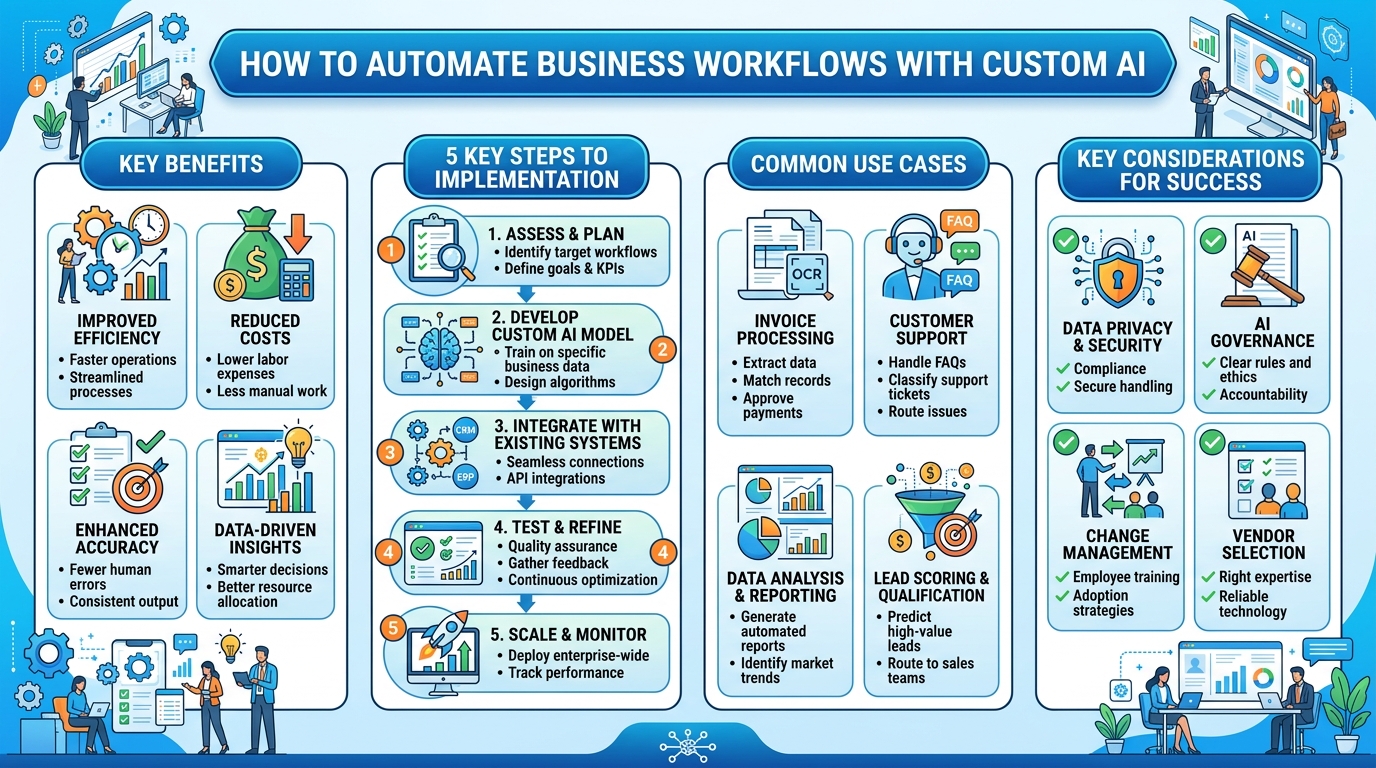
Begin by auditing your current operational processes to pinpoint tasks that are repetitive, rules-based, and time-consuming. Focus on areas where human intervention is primarily used for data entry or sorting rather than decision-making.
Effective AI automation requires clean, accessible data. Evaluate your existing documentation and digital archives to ensure the information the AI will process is organized, structured, and available for secure integration.
Determine which platforms and tools your AI needs to communicate with, such as your CRM, cloud storage, or accounting software. We design an architecture that connects these endpoints, allowing for seamless data flow and trigger-based automation.
Our engineers build and fine-tune AI models specifically for your unique workflow requirements. This phase ensures the AI understands your company's terminology, document formats, and specific output standards.
Before a full-scale launch, we implement the solution in a controlled environment to validate accuracy and reliability. This phase identifies any edge cases that require adjustment before the system goes live in production.
Once deployed, we provide ongoing monitoring to ensure the system performs as expected under real-world conditions. We also establish maintenance protocols to update the AI as your business processes evolve over time.
Ensure any AI solution you implement complies with industry data protection standards and keeps your sensitive information within your private environment.
Don't try to automate everything at once; identify one high-impact, repeatable process to prove the value and ROI before scaling to more complex systems.
The most effective AI tools are those that plug directly into your current tech stack rather than creating a standalone, disconnected application.
Turn a business workflow into a working AI product without a long agency process.
Ready to build? Get in touch