Prioritize Integration
Ensure your chosen AI document processing tool connects natively with your existing databases to prevent data silos.
Custom AI solutions
Automate document processing with custom AI solutions from CustomSolutions.ai. Reduce errors, cut manual labor, and integrate seamlessly with your business tools.
Manual document processing is a significant bottleneck for many businesses, consuming valuable resources with repetitive data entry, classification, and validation tasks. By integrating custom AI systems, organizations can transform unstructured data from PDFs, emails, invoices, and forms into actionable, structured information. This reduces human error, slashes processing time, and allows staff to focus on high-value decision-making rather than administrative overhead.
At CustomSolutions.ai, we develop tailored AI document processing workflows that integrate directly with your existing infrastructure, such as ERP or CRM systems. Instead of relying on rigid, one-size-fits-all tools, our approach leverages machine learning models fine-tuned to your specific document types and business logic. This ensures higher accuracy, improved compliance, and a system that adapts as your data requirements evolve.
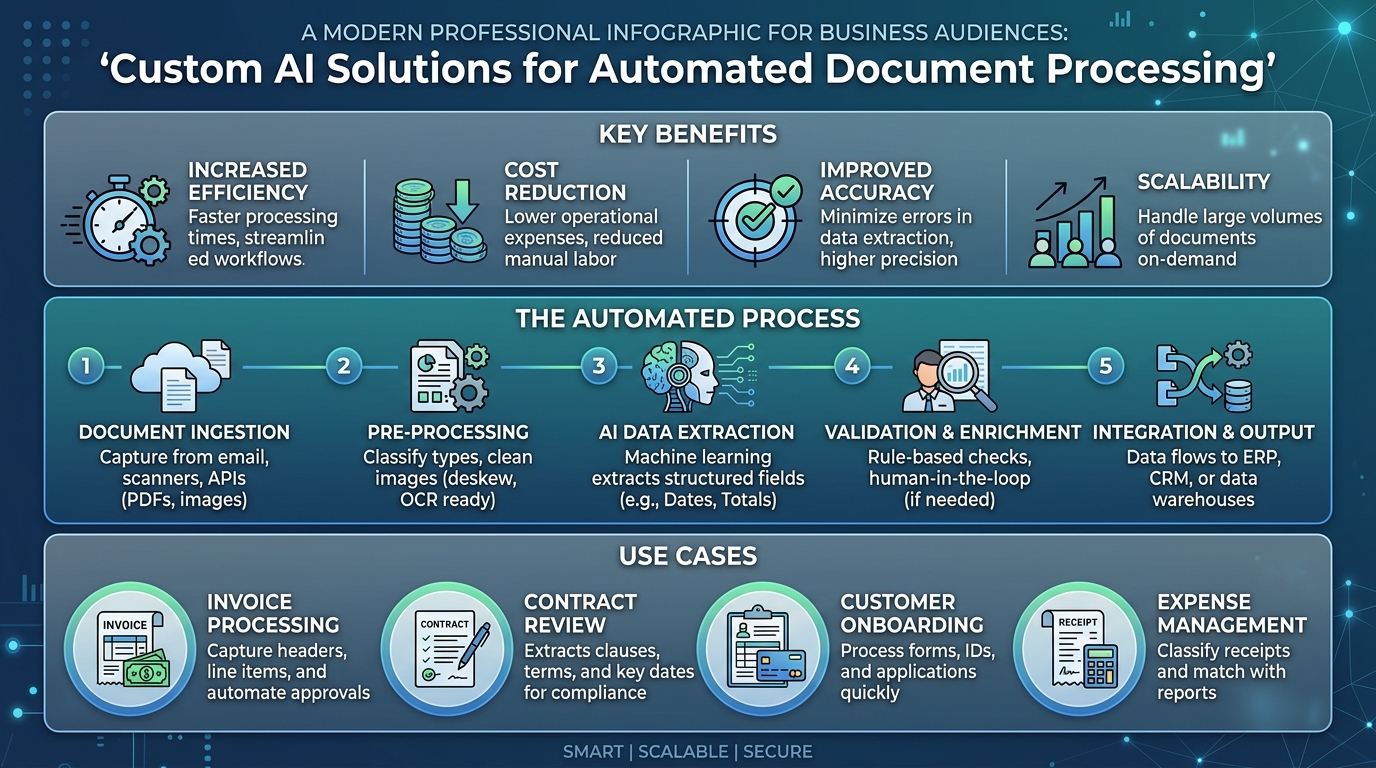
Begin by auditing your current document workflows to pinpoint repetitive, manual tasks. Focus on areas where document volume is high or where data entry errors frequently occur, such as accounts payable, contract management, or customer onboarding.
Assess the nature of the documents you process, distinguishing between structured forms and unstructured text like emails or reports. Understanding the complexity and variability of these documents is critical for selecting the right AI architecture.
Work with our team to define the specific extraction logic and business rules required for your documents. We design models that are tailored to your unique terminology and formatting, rather than relying on generic, off-the-shelf recognition.
We train your AI system using your own historical data to improve accuracy on your specific document layouts. This ensures the model learns the nuances of your industry and specific business context.
Deploy the AI solution so that it connects seamlessly with your existing CRM, ERP, or document management platforms. This allows the processed data to automatically flow into your internal systems without manual intervention.
Establish a validation layer where the AI flags low-confidence data for human review. This ensures 100% data integrity while allowing the system to learn and improve over time through feedback.
Ensure your chosen AI document processing tool connects natively with your existing databases to prevent data silos.
Begin your automation journey with straightforward document types to achieve quick ROI before tackling more complex, unstructured materials.
Select a solution that can handle variable volumes and adapt to new document formats as your business requirements expand.
Turn a business workflow into a working AI product without a long agency process.
Ready to build? Get in touch